
MusicMix: Play music offline
Cloud Importer • Background Lock-Screen Audio • MP3 Cutter • Ringtone MakerTired of streaming apps draining your cellular data or stuttering during flights and underground travels? MusicMix puts you in complete control of your audio library. Seamlessly import your personal tracks from Google Drive, Dropbox, OneDrive, or computer via Wi-Fi, organize custom playlists, edit audio, and enjoy uninterrupted background playback even when your iPhone is locked.

MusicMix - Play music offline
Official Apple App Store Release • Developed by Softnoesis
Explore the Signature Audio Player Suite
Click through the tabs below to preview the mobile interface and see how MusicMix unifies cloud imports, playback freedom, playlist curation, and audio editing.
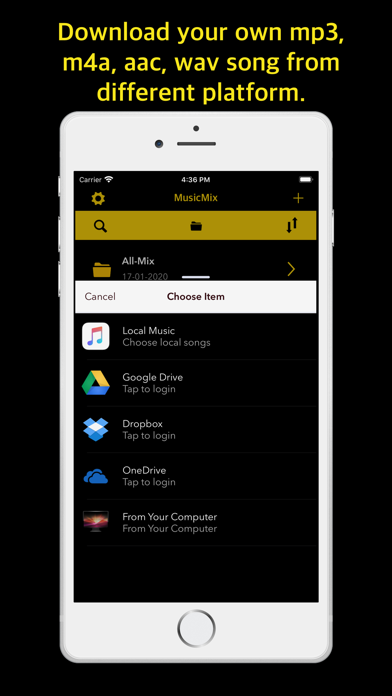
Import Your Audio from Cloud Storage & Local Computers Seamlessly
Free your music library from streaming restrictions and mobile data charges. MusicMix lets you seamlessly import your personal audio files directly from Google Drive, Dropbox, Microsoft OneDrive, local device files, or your desktop computer over local Wi-Fi transfer.
- Multi-Cloud Integration: Directly authenticate and download personal tracks from Google Drive, Dropbox, and OneDrive.
- High-Speed Wi-Fi Transfer: Transfer audio albums directly from your Mac or PC browser without needing iTunes cables.
- Offline Storage Access: Downloaded tracks reside locally on your iPhone, allowing zero-buffering playback anywhere.
- Private & Secure Access: Connects securely to your personal accounts without caching user credentials or sharing audio.
Everything You Need in an iPhone Audio Player
From robust multi-format decoding to precision ringtone trimming, discover why music lovers choose MusicMix for their offline journeys.
Multi-Cloud & Local Wi-Fi Import
Connect to your favorite cloud storage repositories or transfer audio directly from your desktop browser over Wi-Fi.
- Direct import from Google Drive, Dropbox, OneDrive
- In-browser Wi-Fi file upload from Mac and PC
- Import from local Apple Music and iOS Files app
- No cables or tedious iTunes desktop sync needed
Universal Audio Format Decoding
Play your entire music collection without worrying about encoding conflicts or converting files.
- Full support for MP3, WAV, M4A, M4R, and AAC
- Lossless playback fidelity and ultra-low latency
- Accurate metadata tags, track durations & album art
- Smooth seek scrubbing with responsive waveform logic
Background Play & Lock Screen Controls
Experience uninterrupted acoustic streaming while working out, driving, or relaxing.
- Maintains continuous playback when screen is locked
- iOS Lock Screen & Control Center media widget controls
- Full support for Bluetooth headphones and CarPlay
- Compact floating mini player for smooth multitasking
Audio Trimmer & Ringtone Maker
Transform your music into custom notification tones and personalized iPhone ringtones.
- Precise millisecond MP3 trimming and clipping
- Audio merger to concatenate voice memos & tracks
- Direct export to M4R Apple ringtone format
- Quick preview mode before saving edited clips
Advanced Playlist & File Management
Organize your personal song collection exactly the way you want with comprehensive folder utilities.
- Unlimited custom playlist creation & custom reordering
- Batch move, delete, rename, and duplicate audio files
- Shuffle playback algorithm and single-track repeat
- Fast instant-search by title, artist, or file name
Adaptive Light & Dark UI Design
Engineered with Apple Human Interface Guidelines for comfort in all lighting conditions.
- Automatic sync with iOS system Light & Dark modes
- OLED-friendly dark palette saves battery life
- Ergonomic thumb-friendly navigation and bottom tabs
- Accessible typography and high-contrast waveforms
Questions or Feedback Regarding MusicMix?
Our iOS audio engineering and mobile development team at Softnoesis is here to assist you with offline playback, playlist management, or audio format questions.
Frequently Asked Questions about MusicMix - Play Music Offline
How do I import my own music files into MusicMix on iPhone?
You can import your personal music files through multiple flexible channels. Tap the '+' or Import icon inside MusicMix to connect directly to your personal Google Drive, Dropbox, or Microsoft OneDrive accounts. Alternatively, you can use the built-in Wi-Fi Transfer feature to upload music files directly from your computer browser over the local network, or import files from the iOS Files app and Apple Music app.