
VideoCopy is an all-in-one iOS multimedia companion engineered by Softnoesis for iPhone and iPad. It brings together cloud media importing (Google Drive, Dropbox, OneDrive), ultra-fast Wi-Fi file sharing between your PC and iPhone, a private media browser, an offline audio and video player with nano floating mode, and a complete suite of video editing tools including frame trimming, 1-click reverse video, audio extraction to MP3, filters, stickers, and captions.

IPHONE • IPAD • MUSIC & VIDEO STUDIO
VideoCopy: Video Editor, Play
Offline Media Player • Video Trimmer • Private Browser • Cloud & Wi-Fi ImporterTransform how you collect, edit, and enjoy videos and songs on iPhone and iPad. VideoCopy is an all-in-one iOS multimedia engine created by Softnoesis that lets you download media from Google Drive, Dropbox, OneDrive, and desktop computers over high-speed Wi-Fi. Cut and trim clips with frame accuracy, extract MP3 audio, reverse playback, and listen in background mode or with the compact nano floating player.

VideoCopy: Video Editor, Play
Official Apple App Store Release • Developed by Softnoesis
Version
1.50
Stable Production iOS Release
App Rating
4.5 • 2.1K+
Verified Apple App Store Reviews
EXPERIENCE VIDEOCOPY ON IPHONE & IPAD
Explore the Signature iOS Feature Suite
Click through the tabs below to preview the mobile interface and see how VideoCopy empowers content creators and music lovers on iOS.
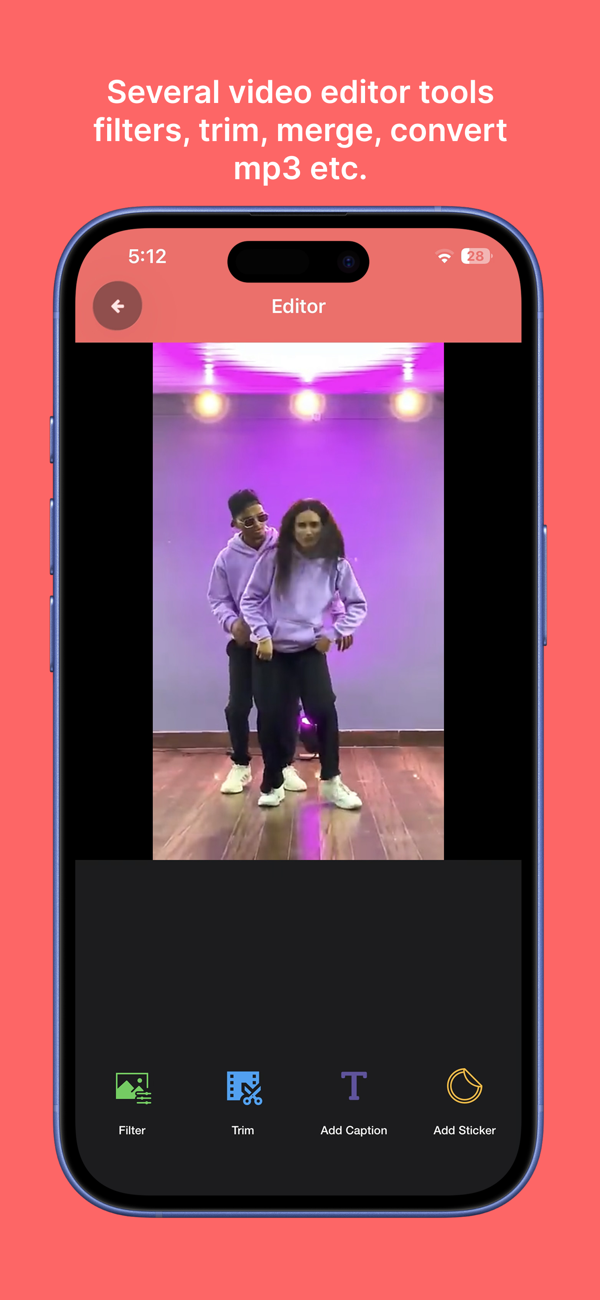
iOS Feature Spotlight
Frame-Accurate Video Trimming, Reverse Loops & MP3 Extraction
Fine-tune and edit your clips with professional mobile tools on iOS. VideoCopy features millisecond frame-accurate trimming, 1-click reverse rewind loops for viral social reels, multi-clip merging, color filters, stickers, custom caption typography, and instant audio extraction to MP3.
- Frame-Accurate Slicing: Scrub with millisecond precision to cut and trim unwanted frames.
- 1-Click Reverse Video: Rewind any video clip instantly for dynamic looping social reels.
- Stickers & Captions: Layer stylish text typography and expressive emoji stickers.
- Convert to MP3: Strip soundtracks from videos into high-fidelity MP3 music tracks.
Get VideoCopy on App StoreRequires iOS 15.0 or later • 41.9 MB
ALL-IN-ONE IOS MULTIMEDIA PLATFORM
Comprehensive Media Tools for iPhone & iPad
Engineered with high performance and privacy in mind, VideoCopy provides creators with full control over media imports, edits, offline playback, and playlists.
Cloud Importer & Wi-Fi Transfer
Import videos and songs directly from Google Drive, Dropbox, and OneDrive, or transfer files from your computer via local Wi-Fi without cables.
- Direct integration with Google Drive, Dropbox, OneDrive
- Fast cable-free Wi-Fi transfer from PC or Mac
- Repost videos from Instagram and Facebook
- Full background file downloading capability
Precision Trimming & Video Tools
Cut clips with frame precision, reverse playback with one click, merge multiple videos together, and style footage with aesthetic filters.
- Frame-accurate trimming and timeline splicing
- 1-click Reverse video rewind effect
- Merge multiple clips into seamless social reels
- Add text captions, stickers, and color filters
Audio Extraction & MP3 Converter
Extract audio from any video in your library to create high-quality MP3 or M4A music files, or strip out background noise completely.
- Convert video files to standalone MP3 audio
- Remove or mute noisy audio tracks from videos
- Layer custom background music soundtracks
- Save extracted tracks into offline music playlists
Nano Player & Background Playback
Enjoy videos in a compact nano floating player while navigating other apps, with uninterrupted playback in the background and on your lock screen.
- Nano floating mini-player for multitasking
- Background mode keeps music playing while app is closed
- Lock-screen controls and iOS Control Center integration
- Play video, M4A, and MP3 files with full seek control
Dedicated Private Media Browser
Explore and play online video and audio streams through an integrated private browser built specifically for multimedia discovery.
- Private browser tailored exclusively for media playback
- Zero history logging or intrusive tracking cookies
- Automatic media stream detection and playback
- Clean, distraction-free browsing experience
Smart File Manager & Playlists
Organize your media into custom folders, import content from WhatsApp and Telegram, and create unlimited custom shuffle playlists.
- Create custom subfolders for organized collections
- Import files from third-party apps like WhatsApp & Telegram
- Unlimited playlists with shuffle and drag-to-reorder
- Quickly rename, delete, share, and export files
PREMIUM MEMBERSHIP TIERS
Flexible Options for Power Users & Creators
Unlock limitless media management, completely ad-free playback, and all creative editing tools.
3 Months Premium
Quarterly Access
Ideal for seasonal projects and short-term video production needs.
- ✓ No folder or download limits
- ✓ 100% ad-free experience
- ✓ All video editing tools unlocked
- ✓ Auto-renewable quarterly plan
MOST POPULAR
Yearly Premium
Annual Pass
Best value for creators, vloggers, and heavy music listeners.
- ✓ Unlimited cloud & Wi-Fi imports
- ✓ Zero advertisements
- ✓ Priority video export engine
- ✓ High-fidelity MP3 audio extraction
- ✓ All future feature updates included
Lifetime Access
One-Time Purchase
Pay once and enjoy permanent VIP access forever with zero recurring fees.
- ✓ One-time lifetime charge
- ✓ Never pay again
- ✓ Complete VIP creative toolkit
- ✓ Permanent ad-free status
VideoCopy Support
Questions or Feedback Regarding VideoCopy?
Our iOS development and AVFoundation engineering team at Softnoesis is here to assist you with video trimming, audio extraction, watermarking, or camera roll export queries.
Clear Answers